
All tutorials
Switch dasha systems and drill down
Change between 37 dasha systems and go from mahadasha to prana in a few clicks.
2 min · 3 steps
- 1
Choose the system
Find the Dasha card on the dashboard. The first menu chooses the family (nakshatra, rashi or Tajika) and the second chooses the system within it, such as Vimshottari, Yogini or Chara.
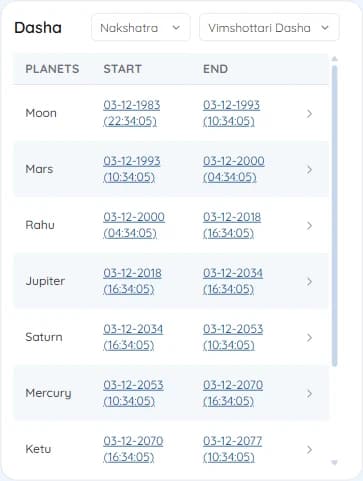
The Dasha card showing Vimshottari mahadashas - 2
Drill into a period
Click any row to open its sub-periods. The breadcrumb above the table shows where you are; click Mahadasha in it, or Reset, to go back up.
Keep clicking to go from antardasha to pratyantar, sookshma and prana.
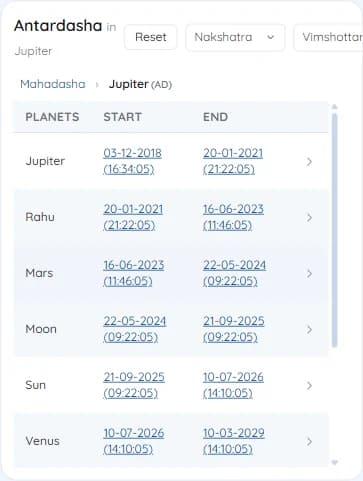
Antardashas inside Jupiter mahadasha, with the breadcrumb - 3
Set your defaults
Open the gear in the chart header and go to Dashas to choose the system the dashboard opens with, the dasha year length, and where the dasha starts.
Try it on your own chart
7 days free on any plan. Cancel before the trial ends and you pay nothing.