
Set the zodiac and step through time on Western charts
Choose tropical or a sidereal zodiac, meet Black Moon Lilith, and move any Western chart through time with the header's stepper.
3 min · 6 steps
- 1
Use the chart header
Every screen under Western in the sidebar reads the chart in the header at the top, so changing the chart there changes every Western screen. Open another saved chart with + → Open chart, or change the birth details with the pencil.
On Western screens the header has two extra controls before Now: the zodiac menu and the time stepper.
- 2
Choose the zodiac
The zodiac menu starts on Tropical, where 0° Aries is the spring equinox, as most Western astrologers use it. Below it, under Sidereal, are the ayanamsas of the Vedic screens, such as Lahiri (Chitrapaksha), Krishnamurti (KP) and Fagan-Bradley: pick one to measure the same charts from the stars.
The natal, transits and relocation charts name the zodiac in their title, for example Natal chart · Tropical. The choice is kept in this browser for the Western screens only and never changes your Vedic ayanamsa. On the screens with the zodiac menu, it is also in the pencil's form, under Advance Options → Zodiac / Ayanamsa.
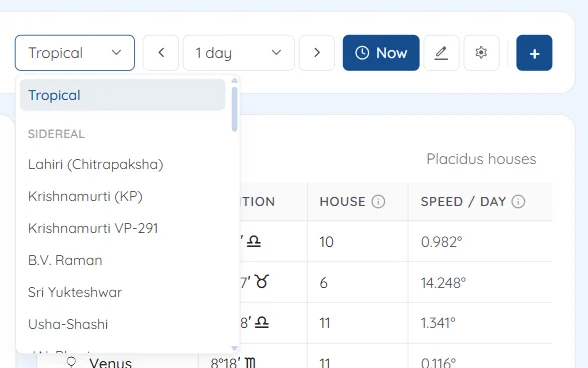
The zodiac menu with Tropical and the sidereal ayanamsas - 3
Know which screens stay tropical
Astrocartography, Sky Calendar, Traditional and Fixed Stars have no zodiac menu, and their pencil form has no zodiac choice. Their lines and events do not depend on the zodiac, or their techniques are defined on the tropical signs, so they are always tropical.
- 4
Find Black Moon Lilith
The Western charts include Black Moon Lilith (⚸), except on Astrocartography, Traditional and Fixed Stars. It is the mean apogee of the Moon's orbit, listed as Lilith with the planets. It is aspected like a planet but is not counted in the chart's balance or in the synastry score.
Planet return, on Progressions & Returns, also finds Lilith's returns to its birth degree, about every 8.85 years.
- 5
Step the chart through time
The stepper beside Now is ◀ unit ▶. Choose the unit in the middle (1 second, 15 seconds, 1 minute, 1 hour, 1 day, 1 month or 1 year) and each click on an arrow moves the chart's date and time back or forward by it. It starts on 1 day, and your unit is remembered in this browser.
Month and year steps keep the day of the month, or use the month's last day when it is shorter: 31 January plus a month is the end of February.
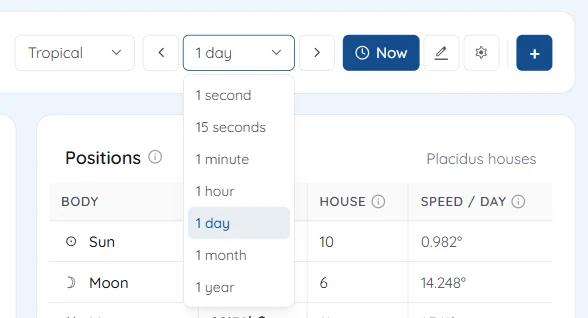
The time stepper with its units from 1 second to 1 year - 6
Save or go back
A stepped chart is no longer your saved chart, so a Save button appears beside the pencil. It still has the saved chart's name, so Save asks what to do: choose Create New to keep the stepped moment as a new chart, because Update overwrites the original with it.
Now replaces it with the chart for this moment at your location, or at New Delhi if your location is not available, and + → Open chart brings back any saved chart.
Try it on your own chart
7 days free on any plan. Cancel before the trial ends and you pay nothing.